What you can do
Everything you need to keep alumni engaged without extra work
Four connected capabilities that turn discharge dates into an ongoing, measurable relationship — all inside the CRM your team already uses.
01
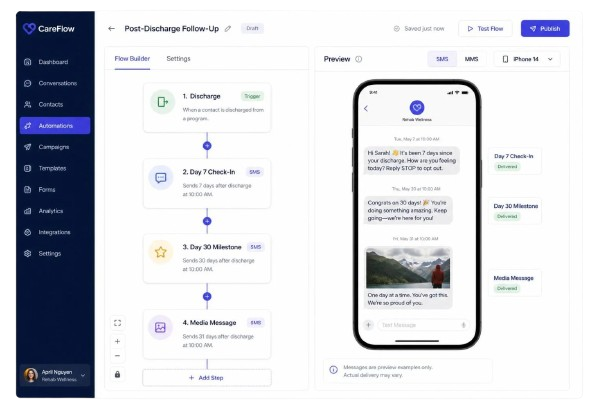
Automated Alumni Engagement SMS Flow
Stay consistently in touch with alumni after discharge by scheduling thoughtful follow-up messages at key milestones. Every client receives timely outreach as they progress through recovery, without your team manually tracking dates or statuses.
With this, you can
- Set up automated SMS flows that trigger after discharge on important days (Day 7, Day 30, Day 90, etc.).
- Ensure messages are sent only to eligible alumni based on discharge type and communication preferences.
- Update message templates anytime to reflect new programs, events, or tone of communication.
- Maintain a structured follow-up cadence across all alumni, ensuring no one is missed.
02
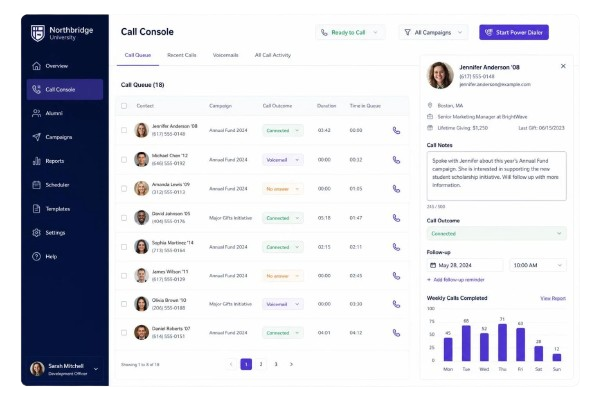
Alumni Call Management
A centralized dashboard shows who needs a follow-up, the status of each interaction, and lets you log outcomes instantly. Your outreach team tracks and updates calls without juggling spreadsheets or manual lists.
With this, you can
- View a list of alumni scheduled for calls, with their status and contact details clearly visible.
- Log the outcome of each call — completed, voicemail, or no-response — with a few clicks.
- Let the system manage call cycles automatically, removing no-response calls after set attempts.
- Quickly update records when alumni return calls, keeping outreach data accurate and organized.
03
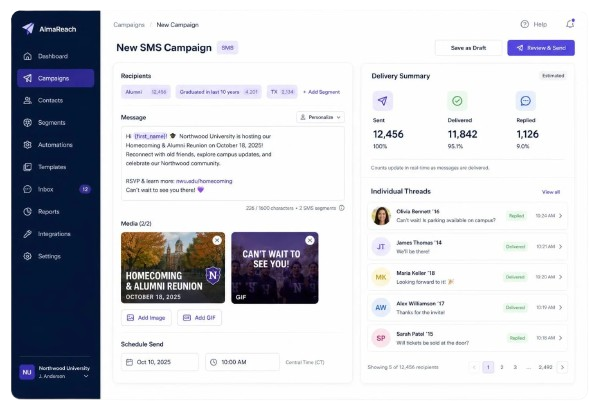
Bulk Media SMS to Discharged Alumni
Share updates, event invites, or wellness tips as group messages enhanced with images or GIFs. Even as a group send, each outreach appears in the client’s own SMS thread, keeping it personal and relevant.
With this, you can
- Select specific groups of discharged alumni using filters like discharge date or program completion.
- Craft engaging messages and attach media files (images, GIFs) to make announcements more dynamic.
- Bulk-send messages that are delivered individually to each alum's SMS thread.
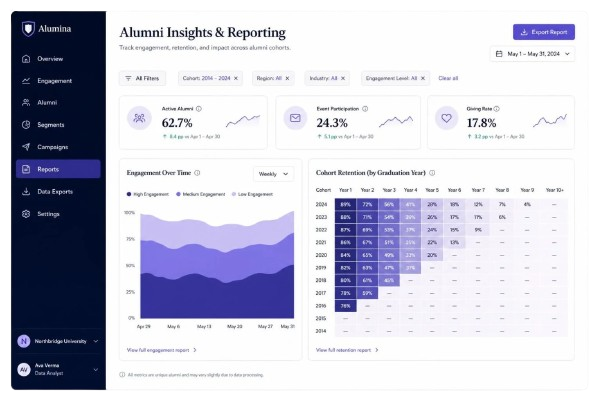
- Monitor delivery and response rates within the system for complete visibility on outreach effectiveness.
04
Single Outbound Media SMS
For individual follow-ups, appointment confirmations, or personalized check-ins, send direct SMS to any alum. Attach images or documents when needed and keep the whole conversation in one place.
With this, you can
- Send personalized text messages directly from the alumni record in Salesforce.
- Attach media files like images or flyers for more impactful communication.
- View the entire message history in an organized SMS thread to maintain context.
- Handle quick updates or individual follow-ups without switching platforms or apps.
See the alumni workflow running on your own data
A 30-minute walkthrough mapped to your discharge types, programs, and outreach cadence.